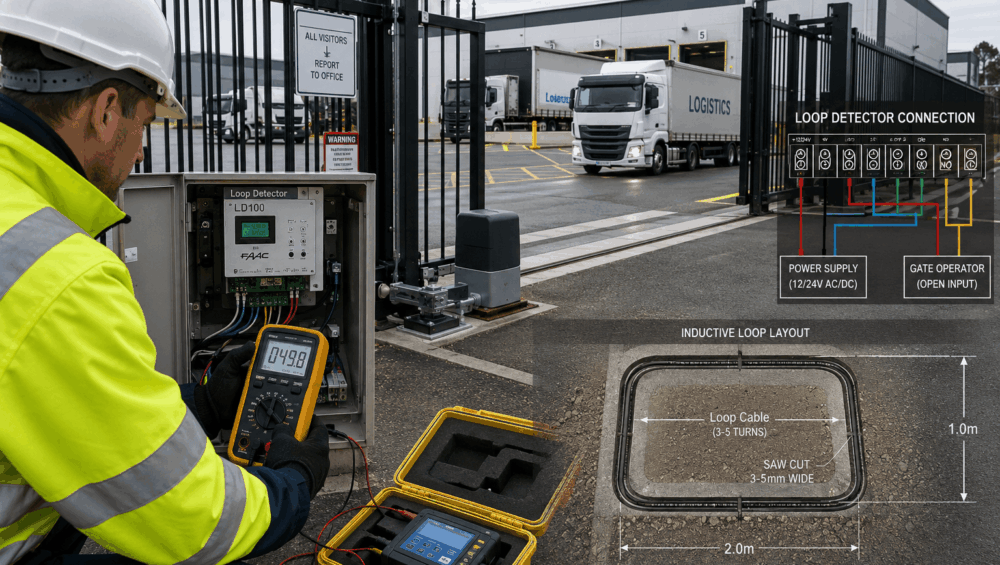
Inductive loop detectors are one of the most widely used vehicle detection technologies in commercial gate automation. Despite advances in access control and sensor technologies, loops remain reliable for vehicle presence detection at high-security sites. However, when faults occur, diagnosing the root cause is not always straightforward. In many cases, installers suspect the detector module or gate controller, only to discover later that the underlying issue is a ground loop.
Effective gate loop detector troubleshooting requires a systematic approach that separates detector faults from cable faults, environmental issues, and integration problems. This guide explains how loop detectors work and outlines the seven key diagnostic steps experienced technicians follow.
Understanding How Loop Detectors Work in Automated Gate Systems
Before beginning any gate loop detector troubleshooting, it helps to understand the fundamental operating principles of inductive loop detection and why certain site conditions increase fault rates.
The Basic Operating Principle
An inductive loop consists of wire embedded beneath the pavement surface. The loop forms part of an electrical circuit connected to a loop detector module located inside the gate controller cabinet.
The detector continuously monitors the loop’s inductance. When a vehicle passes over the loop, its metal mass alters the magnetic field generated by the loop, causing a measurable change in frequency. The detector interprets this change as vehicle presence and sends an output signal to the gate controller.
Because the system relies on precise frequency measurements, even small changes in cable integrity, insulation resistance, moisture levels, or electrical interference can affect performance.
Typical Loop Detector Applications
Different loop types perform different functions within an automated gate system. Safety loops prevent gates from closing on vehicles occupying hazardous areas. Exit loops automatically trigger opening when vehicles approach from the inside. Presence loops maintain the gate open while a vehicle remains within the detection zone. Shadow loops provide additional safety coverage around moving gate leaves.
Why High-Traffic Sites Create Additional Challenges
Constant vehicle movement increases mechanical stress on pavement surfaces. Heavy trucks generate higher loading forces than passenger vehicles. Frequent gate cycling creates greater wear on associated control systems. Environmental exposure, temperature changes, and moisture intrusion gradually affect insulation resistance and cable integrity.
As a result, gate loop detector troubleshooting on high-traffic sites often involves identifying faults that have developed gradually over many years of operation.
Read more: Gate Safety Sensors For High-Speed Automated Gates
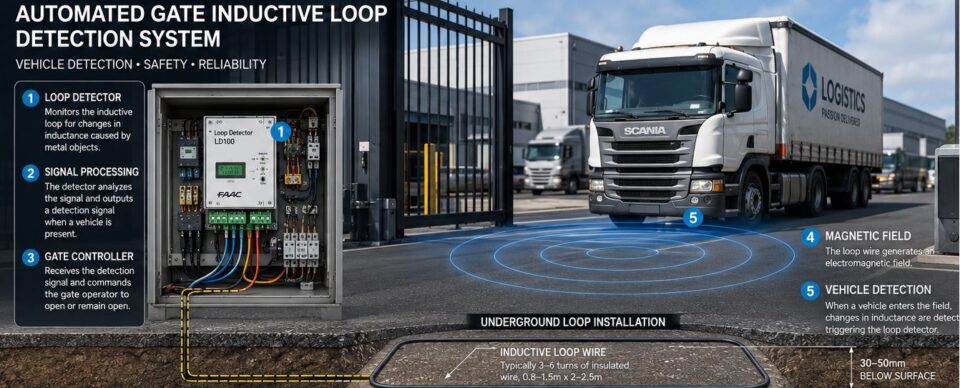
The 7-Step Gate Loop Detector Troubleshooting Process
When approaching any loop-related service call, technicians should follow a logical sequence of tests.
Step 1 – Confirm the Exact Fault Symptoms
The first step in gate loop detector troubleshooting is identifying precisely what the system is doing incorrectly.
Some loops remain permanently active, continuously indicating the presence of a vehicle. Others fail to detect vehicles altogether. Certain faults only appear intermittently, while some sites experience random gate activations without any vehicle present.
Before opening the control cabinet, gather information from site operators. Ask when the fault occurs, whether weather conditions influence operation, and whether recent construction work has taken place nearby.
Reviewing event logs, observing gate behaviour, and collecting evidence before testing can significantly reduce diagnostic time later in the process.
Step 2 – Inspect the Loop Detector Module
Once the symptoms have been identified, inspect the detector module itself.
Most commercial loop detectors provide diagnostic LEDs that indicate power status, loop detection, fault conditions, and operating frequency. These indicators often provide immediate clues about whether the problem lies with the loop circuit or the detector.
Check detector sensitivity settings to ensure they remain appropriate for the vehicle types using the site. Incorrect sensitivity can create missed detections or nuisance triggering.
Frequency settings should also be reviewed, particularly on sites with multiple adjacent loops. Improper frequency separation can cause crosstalk between loops, leading to unstable operation.
Step 3 – Check Loop Resistance and Continuity
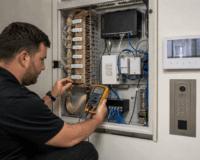
After confirming detector operation, attention should shift to the loop wiring itself. Using a quality multimeter, disconnect the loop from the detector and measure loop resistance.
Most loops exhibit relatively low resistance, typically ranging from a few to several tens of ohms, depending on cable length and loop size. Exact values vary by installation design.
An open circuit reading usually indicates a broken conductor somewhere within the loop or lead-in cable. A short circuit reading suggests damaged insulation, causing conductor contact.
Record all measurements carefully. Historical records provide valuable comparisons during future maintenance visits. In addition, continuity testing alone does not guarantee a healthy loop, but it provides an important starting point for identifying obvious cable faults.
Step 4 – Test Insulation Resistance to Identify Ground Faults
Ground faults are among the most common causes of difficult-to-diagnose loop problems.
Even when continuity and resistance measurements appear normal, insulation breakdown can create unstable operation, false triggering, or permanent presence detection.
A megohmmeter, commonly known as a Megger, should be used to test insulation resistance between loop conductors and earth.
Healthy loops generally exhibit very high insulation resistance values. Lower readings often indicate moisture ingress, cable degradation, or damaged insulation.
On older installations, water penetration into pavement cuts frequently causes insulation values to deteriorate over time. Seasonal weather changes may explain why faults appear only during wet conditions.
When insulation resistance falls below acceptable levels, cable replacement often becomes more economical than repeated repairs.
For many experienced technicians, insulation testing is the most important step in gate loop detector troubleshooting because it frequently identifies faults that basic continuity tests miss.
Step 5 – Examine Loop Lead-In Cable Integrity
The loop itself may be intact while the lead-in cable connecting it to the detector is damaged.
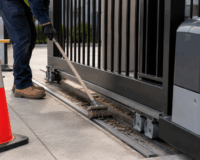
Inspect conduit systems for cracking, crushing, or water ingress. Examine junction boxes for signs of corrosion, contamination, or poor termination practices.
Rodent damage is a surprisingly common cause of intermittent faults in industrial environments. Construction works may also damage buried conduit without operators realising the impact on detection systems.
Lead-in cables running beneath driveways are particularly vulnerable to mechanical damage caused by ground movement and repeated vehicle loading. Any signs of insulation deterioration, exposed conductors, or compromised splices should be addressed immediately.
Step 6 – Identify Electrical Interference Sources
Not all loop faults originate within the loop circuit itself. Electrical interference can create symptoms that closely resemble cable failures.
Potential interference sources include nearby power cables, motor control systems, variable frequency drives (VFDs), pumps, compressors, and large industrial machinery.
Adjacent loop systems may also interact when their frequency settings overlap. Where interference is suspected, temporarily adjusting detector frequencies can help isolate the problem. Some advanced detectors include automatic frequency tuning functions designed to minimise crosstalk.
Documenting interference sources during gate loop detector troubleshooting helps prevent recurring issues during future upgrades.
Step 7 – Verify Gate Controller and System Integration
The final step in gate loop detector troubleshooting involves confirming correct integration between the detector and the gate controller.
Test detector outputs independently from the gate controller. Verify that relays operate correctly and that controller inputs receive the expected signals. Also, review gate logic programming to ensure safety loops, presence loops, and exit loops are configured correctly.
In some cases, detector operation may be perfectly normal, while incorrect controller programming can create unexpected gate behaviour.
Common Ground Loop Faults Found on High-Traffic Sites
The table below summarises some of the most common faults encountered during gate loop detector troubleshooting projects.
| Fault Type | Typical Cause | Common Symptoms | Recommended Fix |
| Water ingress | Damaged sealant | Intermittent triggers | Reseal or replace loop |
| Insulation breakdown | Age and moisture | False presence detection | Replace cable |
| Lead-in cable damage | Construction works | Random operation | Repair cable |
| Open loop | Broken conductor | No detection | Reinstall loop |
| Electrical interference | Nearby services | Unstable operation | Frequency adjustment |
| Poor splices | Corrosion | Intermittent faults | Re-terminate connections |
Advanced Diagnostic Techniques Experienced Installers Use
While standard testing identifies most faults, experienced technicians often use additional diagnostic tools when dealing with complex sites.
Frequency meter analysis allows installers to compare operating frequencies between adjacent loops and identify crosstalk problems. Oscilloscope testing can reveal unstable detector signals that basic meters cannot detect.
Loop inductance measurement provides further insight into conductor integrity and loop geometry. Comparing readings across multiple loops on the same site often highlights abnormalities.
Thermal imaging may occasionally identify underground cable faults by detecting unusual heat signatures associated with damaged conductors.
Temporary detector substitution is another effective technique. Replacing the detector with a known-good unit helps isolate whether faults originate within the detector or elsewhere in the system.
Some technicians also perform isolation testing during low-traffic periods to eliminate operational variables while conducting diagnostics.
Installation Mistakes That Lead to Repeat Service Callouts
Many recurring faults originate from installation errors rather than equipment failures.
Incorrect loop geometry can reduce detection reliability and create inconsistent performance. Excessive lead-in cable lengths increase susceptibility to electrical interference and signal degradation.
Poor twisting of lead-in conductors allows external electromagnetic noise to affect detector operation. Inadequate sealant selection often results in premature water ingress and insulation breakdown.
Running loop cables alongside mains power cables creates significant opportunities for interference. Junction boxes lacking appropriate environmental protection frequently suffer from corrosion-related failures.
Detector sensitivity settings are another common source of problems. Excessively high sensitivity can create nuisance triggering, while low sensitivity may result in missed vehicles.
Perhaps most importantly, many installers fail to document resistance, insulation, and inductance readings during commissioning. Without baseline measurements, future gate loop detector troubleshooting becomes considerably more difficult.
Preventative Maintenance Strategies for Busy Commercial Sites
Preventative maintenance dramatically reduces emergency service calls and extends loop system lifespan.
Annual insulation resistance testing can identify developing faults before they affect gate operation. Visual pavement inspections help detect deteriorating sealant, cracking, and physical damage around loop cuts.
Junction boxes should be inspected regularly for moisture ingress, corrosion, and cable deterioration. Detector calibration and frequency settings should also be reviewed periodically.
Event log analysis often reveals developing trends that indicate future problems. After resurfacing works or major civil projects, additional testing should be performed to confirm loop integrity.
Read more: How Automatic Gate Systems Are Installed For Commercial Properties

When to Repair, Re-Cut, or Replace the Loop System
Minor junction box issues, damaged terminations, and isolated lead-in cable faults can often be repaired economically. Short cable sections may sometimes be replaced without disturbing the entire loop.
However, widespread insulation breakdown, extensive water damage, repeated intermittent faults, or multiple conductor failures often indicate that full loop replacement is the most cost-effective solution.
Replacement projects also provide an opportunity to evaluate newer detector technologies, improve installation practices, and upgrade system documentation to simplify future maintenance.
Frequently Asked Questions
What causes a gate loop detector to stay permanently active?
Permanent activation is commonly caused by insulation breakdown, moisture ingress, detector failure, electrical interference, or a vehicle remaining within the detection area. Ground faults are often the primary cause on older installations.
How do you test a loop detector without removing it?
Most detectors include diagnostic LEDs and status indicators that allow technicians to verify operation while installed. Resistance, continuity, and insulation testing can also be performed from the controller cabinet after disconnecting the loop.
Can water cause intermittent loop detector faults?
Yes. Water ingress is one of the most common causes of intermittent operation. Moisture can reduce insulation resistance, leading to unstable frequency readings and false alarms.
What insulation resistance reading indicates a bad loop?
Acceptable values vary by manufacturer, but healthy loops generally exhibit very high insulation resistance readings. Significantly reduced readings often indicate moisture ingress or insulation deterioration requiring further investigation.
How long do inductive loops typically last?
Properly installed loops can operate reliably for 10 to 20 years or longer. Lifespan depends heavily on traffic volume, environmental conditions, pavement quality, and maintenance practices.
In Conclusion
Reliable vehicle detection is essential for safe and efficient gate automation, particularly on busy commercial sites. Effective gate loop detector troubleshooting involves a structured process that examines detector settings, loop integrity, insulation resistance, electrical interference, and controller integration.
By following these proven diagnostic steps, installers and service technicians can identify the true cause of faults faster and significantly reduce repeat callouts.
If you’re planning a commercial gate upgrade or seeking expert support for automated gate systems, contact DHS. Our team provides professional gate & door automation solutions and industry-leading expertise to help keep your access systems operating safely and reliably.