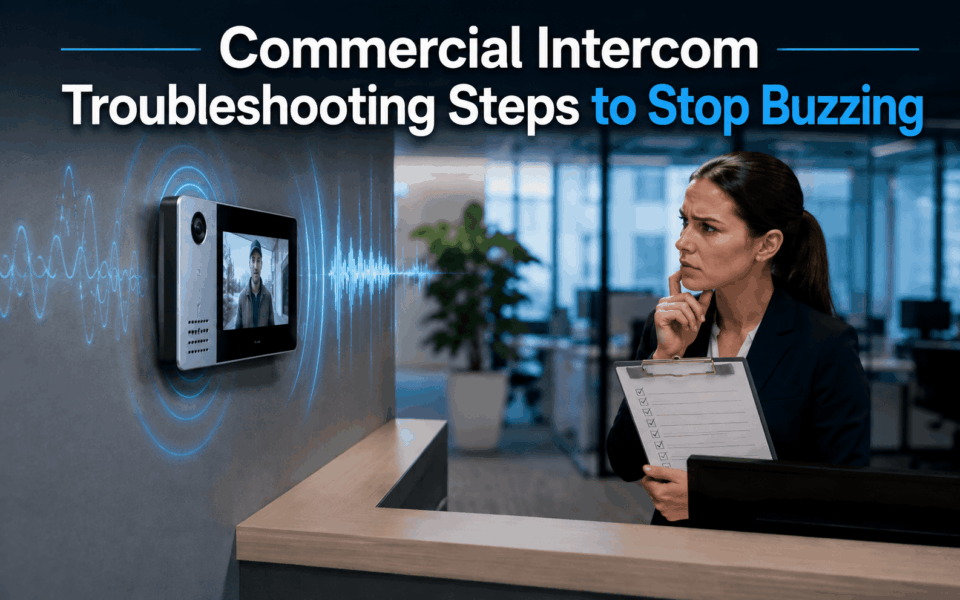
Commercial intercom systems play a critical role in managing visitor access, communication, and security across commercial buildings. When these systems develop buzzing or distorted audio, even simple conversations can become unreliable. Poor audio quality can delay deliveries, affect front-of-house operations, and create security vulnerabilities.
The good news is that many audio issues can be identified through a systematic approach to commercial intercom troubleshooting rather than immediately replacing equipment. This guide explains the most common causes of intercom audio problems and provides practical troubleshooting steps that office managers, facility managers, and building operators can follow before escalating to specialist technicians.
Takeaways:
- Intercom buzzing should be treated as an early warning sign rather than a minor inconvenience, as unresolved interference can reduce communication clarity, compromise access control reliability and lead to more expensive system failures.
- Buzzing can originate from grounding, power, cabling, access control or network problems, so identifying when and where the noise occurs is essential before replacing any equipment.
- A structured troubleshooting checklist helps office managers identify whether intercom buzzing comes from power, grounding, cabling, access control or network issues before arranging unnecessary repairs or equipment replacement.
- Ground loops create unwanted current between different grounding points, producing a steady hum that commonly appears after office renovations, equipment upgrades or access control expansions.
- Intercom performance can be affected by connected building technologies, so troubleshooting should consider the wider electrical, security, network, lighting, HVAC and automation environment.
- Repair remains suitable for isolated faults, but repeated failures, obsolete equipment and deteriorated cabling may make system replacement more reliable and economical over the long term.
- Regular inspections, correct grounding, suitable cable separation and accurate documentation of building modifications can prevent recurring interference and extend the intercom system’s service life.
Why Intercom Buzzing Should Never Be Ignored
Noise and audio clarity already affect comfort and communication in office environments. Research published by the U.S. General Services Administration found that almost half of surveyed office occupants were dissatisfied with workplace noise, while nearly 60% raised concerns involving noise and distractions. A buzzing or distorted intercom can add another communication barrier.
Many building managers assume a small amount of buzzing or humming is simply part of an ageing intercom system. In reality, audio interference is often an early warning sign of underlying electrical or communication faults.
When left unresolved, these issues can gradually worsen, affecting system reliability and increasing repair costs. What begins as a minor hum may eventually develop into intermittent communication failures or complete audio loss.
Some of the key risks associated with unresolved audio interference include:
- Missed visitor communications and delayed access requests
- Security vulnerabilities at controlled entry points
- Reduced speech clarity during emergency situations
- Higher maintenance and service call costs
- Increased strain on electronic components that may shorten equipment lifespan
Office managers commonly report symptoms such as:
- Constant humming sounds
- Buzzing that appears when a door release activates
- Crackling or static during conversations
- One-way audio issues
- Intermittent distortion during busy operating periods
Rather than treating these symptoms individually, effective commercial intercom troubleshooting focuses on identifying the root cause. This approach saves time, reduces unnecessary component replacements, and often reveals issues affecting other building systems as well.
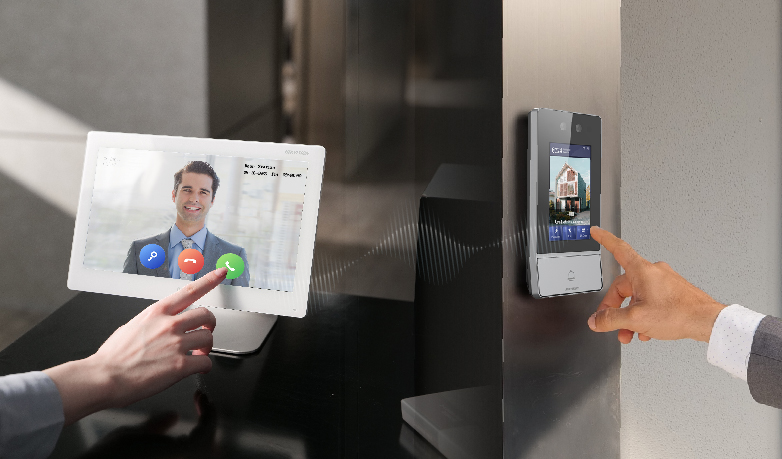
Commercial Intercom Troubleshooting: What are the Most Common Causes of Buzzing
Before beginning any diagnostic process, it helps to understand the most common sources of interference found in commercial environments.
| Cause | Typical Symptom | Common Location |
| Ground loops | Continuous low-frequency hum | Buildings with multiple power sources |
| Power supply faults | Buzzing that worsens over time | Control cabinets and power distribution points |
| EMI interference | Static, crackling, intermittent noise | Near electrical equipment |
| Damaged cabling | Intermittent audio issues | Long cable runs and outdoor installations |
| Network issues | Delayed or distorted audio | IP intercom systems |
| Faulty door strikes | Buzz during access activation | Entry doors and gates |
| Poor installation practices | Random audio faults | Retrofit projects |
For example, an office tower may experience interference from lift motors located near communication cabling. A warehouse may encounter noise introduced by variable-speed drives controlling industrial machinery. In commercial facilities that have undergone multiple upgrades, ground loops are particularly common because equipment from different generations may be connected to different electrical circuits.
Understanding these potential causes allows building managers to approach commercial intercom troubleshooting methodically instead of guessing which component is at fault.
Commercial Intercom Troubleshooting Checklist for Office Managers
The following seven-step process covers the most common causes of buzzing and interference. When audio issues occur, a structured investigation helps isolate the source more quickly.
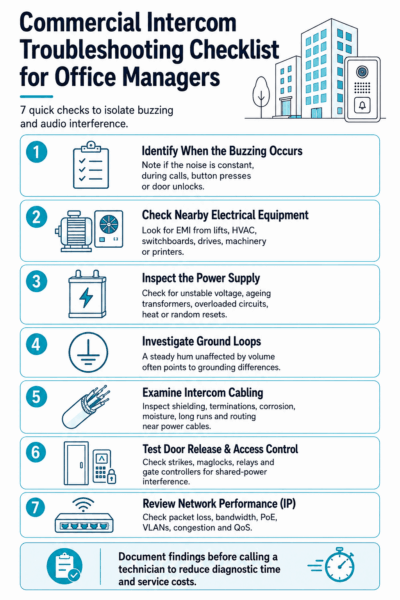
Step 1 – Identify When the Buzzing Occurs
The first task is determining exactly when the noise appears.
Is the buzzing present continuously throughout the day? Does it occur only during conversations? Is it triggered when someone presses the call button or unlocks a door?
Patterns often reveal valuable clues. A constant hum may suggest a grounding issue or power supply fault. Intermittent noise could point toward electromagnetic interference or network congestion.
Pay attention to whether the problem occurs during specific operating hours. If distortion appears only during busy periods, there may be an underlying power quality or network capacity issue.
Step 2 – Check Nearby Electrical Equipment
Commercial buildings contain numerous electrical systems that can generate electromagnetic interference.
Common sources include lift motors, HVAC equipment, switchboards, variable-speed drives, industrial machinery, and large photocopiers and printers. These devices generate electrical noise that can be induced into nearby communication circuits.
If audio problems began shortly after new equipment was installed, interference is a strong possibility. Temporarily shutting down nearby equipment during testing may help confirm whether EMI is contributing to the problem.
Proper cable routing and separation from power infrastructure are essential components of effective commercial intercom troubleshooting.
Step 3 – Inspect the Power Supply
Power-related faults are among the most overlooked causes of audio interference.
Intercom systems rely on stable voltage to maintain clear communication. Ageing transformers, failing power supplies, overloaded circuits, or voltage fluctuations can introduce unwanted noise into the system.
Warning signs may include:
- Buzzing that gradually increases over time
- Equipment running unusually warm
- Random system resets
- Intermittent communication failures
Shared power circuits can also create issues when other devices place heavy demands on electrical infrastructure.
Step 4 – Investigate Ground Loop Problems
Ground loops are one of the most common causes of low-frequency humming in commercial buildings.
A ground loop occurs when multiple paths to earth create slight differences in electrical potential. These differences generate unwanted current flow through communication circuits, producing the familiar hum often heard in audio systems.
Commercial sites are especially vulnerable because equipment may be connected across multiple electrical panels, circuits, or building sections. Retrofit projects frequently introduce ground loop issues when new equipment is integrated with existing infrastructure without reviewing grounding arrangements.
If the noise remains unchanged regardless of volume settings, a ground loop may be present.
Read more: Akuvox 2 Wire Ip Intercom Kit Retrofit
Step 5 – Examine Intercom Cabling
Physical cabling problems can affect audio performance. Over time, cables may be damaged by moisture, mechanical stress, environmental exposure, or accidental impacts during maintenance activities.
Inspect for:
- Damaged shielding
- Loose terminations
- Corrosion
- Moisture ingress
- Excessive cable lengths
- Incorrect cable routing
Long cable runs are particularly vulnerable to signal degradation and interference. Communication cables installed alongside power cabling may also pick up unwanted electrical noise.
Step 6 – Test Door Release and Access Control Devices
Many commercial buildings experience buzzing only when a door strike or a magnetic lock is activated. This symptom frequently indicates interference caused by access control hardware that shares power supplies or electrical pathways with the intercom system.
Electric strikes, magnetic locks, relay modules, and gate controllers can all introduce electrical noise during operation. Testing these devices individually helps determine whether they are contributing to the problem. In some cases, dedicated power supplies or improved isolation may eliminate the interference entirely.
When conducting commercial intercom troubleshooting, always consider how access control devices interact with communication systems.
Read more: Apartment Gate Automation Systems: Intercom Gate Door Release Workflow Guide (2026)
Step 7 – Review Network Performance (For IP Intercoms)
Modern IP intercom systems depend heavily on network performance. Unlike traditional analogue systems, IP-based communications can suffer from issues such as:
- Packet loss
- Bandwidth limitations
- PoE switch problems
- VLAN configuration errors
- Network congestion
Poor network performance may cause distorted audio, delayed communication, dropped calls, or intermittent connectivity. Reviewing switch logs, monitoring bandwidth usage, and verifying Quality of Service (QoS) settings can help identify network-related causes.
Before escalating to technicians, document all findings from each troubleshooting step. A clear record of observations significantly reduces diagnostic time and service costs.

What are Ground Loops? The Hidden Cause of Intercom Hum
In simple terms, a ground loop occurs when equipment connected to different grounding points creates an unintended electrical circuit. Small voltage differences between those grounding points allow current to flow where it shouldn’t. Ground loops deserve special attention in commercial intercom troubleshooting because they are frequently misunderstood.
That unwanted current becomes audible as a low-frequency hum within the communication system. Unlike crackling or static, ground loop noise is often consistent and remains present regardless of volume adjustments.
Signs You May Have a Ground Loop:
- Noise appeared after installing new equipment
- Multiple power sources are involved
- Buzzing remains constant even when volume changes
- Several devices experience similar symptoms simultaneously
Commercial office upgrades often create ideal conditions for ground loops. For example, adding new access control equipment, upgrading network infrastructure, or expanding tenant spaces may introduce additional grounding paths.
Proper grounding design and verification during system upgrades remain among the most effective ways to prevent future audio issues.
When Audio Interference Comes From Other Building Systems
Modern smart buildings contain numerous interconnected technologies that can affect communication systems. Common audio interference sources include:
- Access control systems – Shared electrical pathways can introduce noise during door operation.
- Security cameras – Poorly grounded equipment may create interference across connected systems.
- Network switches – Faulty or overloaded hardware can affect IP intercom performance.
- LED lighting drivers – Certain drivers generate electrical noise that impacts nearby communication cabling.
- Solar power inverters – Electrical harmonics may interfere with sensitive electronic equipment.
- HVAC systems – Motors and variable-speed drives are common sources of EMI.
- Elevator machinery – High-power electrical equipment can create significant interference.
- Building automation systems – Poor integration practices sometimes create grounding and communication conflicts.
As buildings become increasingly connected, successful commercial intercom troubleshooting requires a broader understanding of how various technologies interact.
Repair or Replace? Knowing When Troubleshooting Isn’t Enough
While many audio problems can be resolved through targeted repairs, there are situations where replacement becomes the more economical option than normal commercial intercom troubleshooting.
Systems experiencing repeated audio faults despite multiple repairs may indicate broader infrastructure issues. Obsolete analogue equipment can become difficult to support as spare parts become scarce and manufacturer support ends.
Significant cable degradation is another warning sign. Replacing individual components may provide temporary relief, but underlying infrastructure problems often continue generating service calls.
Facility managers should compare ongoing repair costs against the benefits of modern IP intercom systems. Newer solutions typically offer improved audio quality, enhanced integration capabilities, remote management features, and better long-term support.
Digital Home Systems (DHS) can assess the existing intercom, cabling, power supply, network infrastructure and connected access control equipment to determine whether repair, partial upgrading or full replacement is the most practical option.
When maintenance expenses continue rising year after year, a planned upgrade may provide greater reliability and a lower total cost of ownership than continuing to repair an ageing system.
How to Prevent Future Intercom Audio Problems
Preventative maintenance remains the most effective way to reduce recurring audio interference and maintain reliable communication throughout an office building.
- Schedule regular system inspections: Routine checks can identify deteriorating components, loose terminations, corrosion and emerging power problems before they interrupt daily operations.
- Review grounding during every upgrade: New intercom, access control or network equipment may introduce additional grounding paths. Grounding arrangements should therefore be checked whenever equipment is replaced or expanded.
- Separate communication and power cabling: Intercom cables should be kept away from mains wiring, switchboards, lift equipment, HVAC systems and other sources of electromagnetic interference wherever possible.
- Use suitable shielded cabling: High-quality shielded cable provides greater protection against electrical noise, particularly in plant rooms, risers and other electrically noisy areas.
- Document all system modifications: Building managers should maintain records of equipment replacements, electrical work, network upgrades and access control changes. This information can significantly reduce future diagnostic time.
- Test the intercom after building works: Renovations, electrical upgrades and newly installed office equipment can introduce interference even when the intercom itself has not been modified. Audio and door-release functions should be tested after any significant building change.
By following these preventative measures, organisations can improve system reliability, reduce downtime and minimise the need for repeated commercial intercom troubleshooting.
Read more: Intercom Planning for Strata Committees: Questions Before Approving an Upgrade

FAQs
Why is my office intercom making a constant buzzing sound?
A constant buzz often indicates a ground loop, power supply problem, or electrical interference. The issue may stem from multiple grounding paths, failing transformers, or nearby electrical equipment generating unwanted noise.
Can electrical equipment cause intercom interference?
Yes. HVAC systems, lift motors, switchboards, variable-speed drives, and other high-power equipment can generate electromagnetic interference that affects communication circuits, causing buzzing or static.
What is a ground loop in an intercom system?
A ground loop occurs when equipment has multiple grounding paths that create slight voltage differences. These differences allow unwanted current flow, producing a persistent humming sound.
Why does the buzzing happen when someone unlocks the door?
Door strikes, magnetic locks, relay modules, and shared power circuits can introduce electrical noise when activated. This often causes buzzing that appears only during door release events.
Should I repair or replace an old commercial intercom?
If the system frequently requires repeated service visits, replacement may be more cost-effective than ongoing repairs. Modern IP systems often provide better reliability and functionality.
Read more: Network Topology Of 2-Wire IP Intercom Systems
In Conclusion
Buzzing and distorted audio should never be dismissed as normal behaviour in commercial communication systems. Whether the cause is a ground loop, power supply fault, electromagnetic interference, damaged cabling, access control equipment, or network performance issue, a structured approach to commercial intercom troubleshooting is essential before costly replacements become necessary.
Need Expert Help With Commercial Intercom Troubleshooting?
If your office, warehouse, strata property, or commercial facility is experiencing persistent audio interference, the team at DHS can help. We provide professional diagnosis, system upgrades, intercom integration, access control solutions, and ongoing technical support across a wide range of commercial environments.
Contact us today to discuss your intercom issues and find the most effective solution for clear, reliable communication.